How to Adjust Heater Temperature: Quick, Safe Guide
Learn how to adjust your heater temperature safely and efficiently. This step-by-step guide covers thermostats, smart controls, and troubleshooting to improve comfort and energy savings in 2026.


To adjust your heater temperature, locate the thermostat or control panel, set the thermostat to the desired temperature, and test by feeling the air after 5-10 minutes. If your system has multiple zones, adjust each zone separately. For gas or electric heaters, consult the owner's manual if you notice inconsistent heating.
Why Temperature Control Matters
If you're wondering how to adjust heater temperature, this guide explains why temperature control matters and how to approach it safely. Comfortable, consistent heating starts with a sensible target and a quick check of your equipment. According to Heater Cost, precise temperature control can improve comfort and reduce energy waste across a home. Start by understanding your system and the room you’re heating. Small changes can yield noticeable benefits over a full day or week.
Understanding Your Heating System
Before you touch the controls, identify your heating system type. Traditional furnaces with a wall thermostat work differently from modern heat pumps or multi-zone boilers. The thermostat serves as the bridge between you and the system. Knowing whether you have a single-zone or multi-zone layout helps you plan adjustments, ensuring you’re not fighting an upstream limit or a trapped air issue. Heater Cost analysis shows that knowing your setup leads to safer, more effective adjustments.
How to Adjust a Traditional Thermostat
Traditional thermostats use a dial or digital readout. Start by setting a moderate target (for example, a gradual 1–2 degree change) and observing the system response over 15 minutes. If the room doesn’t feel right, adjust again in small increments. Avoid turning the dial too quickly or setting extreme temperatures. If you notice frequent cycling or a very long warm-up, consult the manual or a technician.
How to Use a Smart Thermostat
Smart thermostats add scheduling and remote control. Begin by selecting a baseline temperature, then program daily schedules that align with your routine. Use geofencing or occupancy-based learning to minimize energy use when nobody is home. If you notice temperature swings, check sensor placement and update firmware. Smart devices provide a clear history of adjustments, which helps you refine settings.
Room Zoning and Multi-Zone Systems
If your home has multiple zones, you may need to tailor temperatures in each area. Start by measuring temperatures in representative rooms with a thermometer. Adjust each zone’s thermostat or panel to meet the target. In some configurations, a central controller may override individual zones during peak demand. Address zoning issues by inspecting dampers, vents, and the zone controller.
Common Issues and Troubleshooting
If changes don’t reflect quickly, check the power supply, batteries in wireless thermostats, and ensure the thermostat is set to the correct mode (Auto vs. On). Dirty sensors, blocked vents, or drafts can fool a thermostat into reporting the wrong temperature. If you find the thermostat isn’t communicating with the furnace, consult your manual or a technician.
Maintenance to Keep Temperature Accurate
Regular maintenance helps temperature readings stay accurate. Replace batteries as needed, schedule annual professional tune-ups, and clean or replace air filters. A dirty filter or obstructed ductwork can cause uneven heating. Routine calibration checks keep your readings honest and your system efficient.
Safety and Energy Tips
Avoid extreme settings that stress the system. Use energy-saving habits like turning down the heat when you’re away or asleep, and using programmable settings to balance comfort with cost. The Heater Cost team recommends following manufacturer guidelines and seeking professional help for persistent issues.
Tools & Materials
- Thermostat or heater control panel(Ensure it’s installed and functional)
- Owner's manual for your heater model(Keep handy for model-specific settings)
- Basic screwdriver (if panel access requires removal)(Phillips or slotted depending on model)
- Room thermometer or smart thermostat reading(Useful for cross-room checks)
Steps
Estimated time: 15-25 minutes
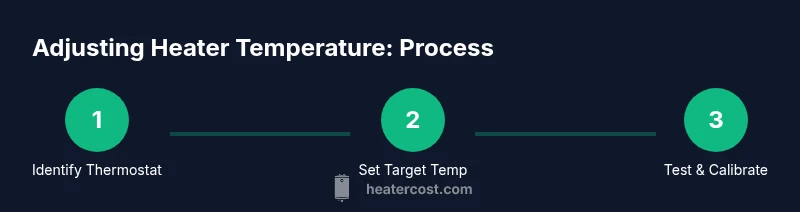
- 1
Identify the thermostat/control panel
Locate the main thermostat or control panel and confirm the model. Read the manual to understand the supported modes and temperature range. This helps you plan safe adjustments.
Tip: Take a photo of current settings before making changes. - 2
Set a target temperature gradually
Choose a moderate target and adjust in small increments (1–2 degrees). Allow 10-15 minutes for the system to respond before testing in the room.
Tip: Avoid large jumps; small steps prevent overshooting. - 3
Test room temperature and airflow
Feel the air and check if the room reaches the target. Close doors to keep the test consistent, and measure with a thermometer for accuracy.
Tip: If airflow is weak, check vents and filters. - 4
Repeat for multi-zone systems
If you have multiple zones, repeat the adjustments in each zone until the overall comfort target is met.
Tip: Record zone temperatures to compare progress. - 5
Calibrate thermostat if readings are off
Some thermostats allow calibration in the menu. If readings consistently differ from actual room temperature, calibrate per manual.
Tip: Small calibration changes yield better accuracy. - 6
Review safety & energy impact
Confirm you’re within safe operating ranges and consider energy-saving schedules if your device supports them.
Tip: Document the final target for future reference.
Got Questions?
What is the safest way to adjust temperature on a wall thermostat?
Begin with small changes and use the Auto mode. Avoid rapid, large temperature shifts. Refer to the manual for any model-specific safety guidance.
Start with small changes in Auto mode and consult your manual for safety tips.
Why won't my heater respond to temperature changes?
Check batteries, ensure the thermostat is powered, and verify the system isn’t stuck in a conflicting mode. If issues persist, consult the manual or a technician.
Check power and mode, then consult the manual if it remains unresponsive.
How often should I calibrate my thermostat?
Calibrate yearly or when you notice large temperature swings. Follow the manual’s recommended procedure.
Calibrate once a year or if you notice big temperature swings.
Can I adjust temperature with a smart thermostat remotely?
Yes. Use the app to schedule and adjust temps. Ensure firmware is up to date and your account is secure.
Yes, via the app; keep firmware updated.
What should I do if a room never warms up after adjusting?
Check insulation, vents, and drafts. If the problem persists, consult a technician.
Check insulation and vents; call a pro if needed.
Watch Video
The Essentials
- Identify and use the correct control for your system.
- Make small temperature changes and test before adjusting again.
- Calibrate when readings don’t match actual room temperature.
- Multi-zone setups require zone-specific adjustments.
- Follow manufacturer guidance and consult a pro if in doubt.