Night Thermostat Settings: What to Set for Sleep Comfort and Savings
Learn how to set your heater at night for comfort and energy savings. Find the ideal night temperature range, smart scheduling tips, safety notes, and practical steps you can implement tonight.


For most homes, set the thermostat at night between 60-68°F (15-20°C). Lowering the temperature reduces energy use while keeping you comfortably warm, especially when you wear appropriate sleepwear and use layered bedding.
What should heater be set at night
Temperature choices at night directly affect both comfort and energy bills. Your body naturally cools as you fall asleep, and a slightly cooler environment can help you drift off faster and stay asleep more soundly. A common starting point is a bedroom set-point in the 60-68°F range (15-20°C). If you live in a drafty home or experience cold feet, you may prefer a slightly higher target, but you should still aim to avoid big swings that wake you up. Pairing a cooler room with appropriate sleepwear and layered blankets often feels more comfortable than cranking up the heat. Over the course of a full heating season, small, nightly setbacks add up to meaningful savings. Safety considerations include keeping doors and windows closed and ensuring that pipes in unheated areas are protected from freezing. The goal is to balance warmth with efficiency without sacrificing sleep quality or safety.
Understanding Ideal Ranges by Climate
The right night temperature can vary by climate, insulation, and personal comfort. In colder climates or poorly insulated homes, a modest setback helps the heating system run more efficiently without making the bedroom feel uncomfortably cold. In milder climates or well-insulated homes, the same range typically provides ample comfort while still delivering savings. As a general rule:
- Cold/very cold climates: target 62-66°F (16-19°C) with layered bedding and a programmable schedule.
- Moderate/temperate climates: target 60-68°F (15-20°C) and adjust based on humidity and drafts.
- Hot or humid climates: you may not want to drop too far; focus on humidity control and air circulation in addition to temperature.
If you use a heat pump or zone heating, you can afford to be more precise with zoning to maintain comfort in bedrooms while saving on living spaces that aren’t in use. Keep in mind that humidity plays a role; drier air feels cooler, and adding moisture can make the same temperature feel warmer. The key is to experiment within a reasonable range and track how you sleep and how your energy bill responds.
How to Find Your Personal Comfort Zone
Finding your personal comfort zone at night involves a simple, repeatable process. Start with a baseline in the 66°F (19°C) neighborhood and adjust by 1-2 degrees each night while keeping a sleep diary or using a note in your thermostat app. Pay attention to how you fall asleep, whether you wake during the night, and your overall morning comfort. If you notice resting heart rate or sleep latency changes, you may be in the wrong zone. Consider clothing choices, bedding, and room humidity as you fine-tune.
Step-By-Step: Setting Your Thermostat for Night
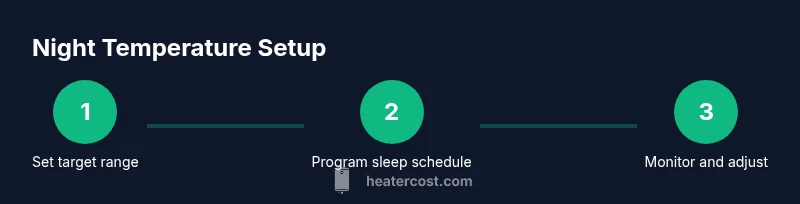
A well-planned night schedule can provide consistent comfort without waking you up. The following approach lays a solid foundation for a good night’s sleep while saving energy. Start with a target range, then program your thermostat to gradually reach that range before you fall asleep and maintain it until morning. If you’re new to programmable or smart thermostats, this will help you get to a steady, comfortable night temperature quickly.
Zoning and Smart Controls: Practical Setups
If your home supports multiple zones or smart controls, you can tailor night settings to bedrooms or living areas independently. Use a bedroom zone to maintain the preferred night temperature while keeping common areas a bit cooler (or warmer) based on use. Smart thermostats can learn your patterns and adjust automatically, or you can create separate sleep schedules for each zone. For homeowners with limited HVAC zoning, a draft-detecting curtain or portable space heater in specific areas can complement a centralized system without compromising safety.
Safety Considerations When Lowering Temperature
Lowering your thermostat for the night lowers energy use, but safety should come first. In winter, ensure pipes in unheated spaces are protected with insulation or heat tape. Maintain working CO and smoke detectors, as heating systems can present risks if components malfunction. Do not leave doors or windows open to “vent” the home for warmth, use proper humidification/air circulation instead. If you have an elderly person, infant, or a medical condition bound to temperature, consult a clinician to determine the safest range and adjust gradually.
Sleep Quality and Health Impacts: Temperature and Sleep
Sleep science consistently shows that a cooler room generally facilitates faster sleep onset and improved sleep quality for many people. A moderate night setback can support deeper sleep stages, provided you’re warmly dressed and well covered. However, excessive cooling or drafts can cause discomfort that disrupts sleep. Balancing comfort with a slightly cooler environment is often better than staying warm by over-heating the space. Humidity management also matters: very dry air can irritate the airway, while overly humid air can hinder comfort and encourage condensation and mold growth. A well-timed temperature strategy supports both sleep health and energy efficiency.
Seasonal and Occupant Variability: Kids, Seniors, Pets
Different household members may require different night temps. For children and seniors, a slightly warmer set-point can improve comfort without significantly increasing energy use when paired with appropriate bedding and sleepwear. Pets are generally comfortable with typical room temperatures, but keep animals away from drafts and heat sources. In all cases, establish a family plan for night-time temperatures, and adjust gradually to minimize disruptions. For a longer-term approach, couple your night settings with seasonal adjustments that respond to seasonal changes in daylight hours and external temperatures.
Quick-Start Checklist for Tonight
- Review existing night schedule and current room temperatures.
- Decide a target night range (typically 60-68°F / 15-20°C).
- Enable sleep mode or set a dedicated sleep schedule on your thermostat.
- Close curtains to reduce heat loss and keep drafts out.
- Ensure doors and windows are closed and check for obvious drafts.
- Layer bedding and sleepwear to reduce the need for heat.
- Run a short test cycle to confirm the space reaches the target range before you sleep.
- Confirm that the next morning temperature is comfortable and not too cold.
- Document changes in your app or notebook for ongoing tweaks.
- Revisit the plan after a week to adjust the range as needed.
Tools & Materials
- Programmable or smart thermostat(Should support scheduling and night override features.)
- Wi-Fi or Bluetooth connection(Needed for remote control and smart scheduling.)
- Thermometer or indoor humidity sensor(Helps monitor room conditions for comfort.)
- Extra bedding (sleepwear, blankets)(Allows comfortable cool temperatures without overheating.)
- Thermal curtains or window treatments(Reduces heat loss at night.)
- Smoke/CO detectors tested and functional(Maintains safety with heating system use.)
- Power strip or surge protector(Useful for multiple devices in the bedroom.)
- Emergency backup heat plan(Have a safe backup plan for extreme cold spells.)
Steps
Estimated time: 20-30 minutes
- 1
Review current night schedule
Open your thermostat app or panel and note the current night temperatures and times. Identify when heat starts and stops, and whether there are any abrupt changes during the night. Understanding the baseline helps you plan a smoother setback.
Tip: Document the current times and temperatures to reference during adjustments. - 2
Set a target night temperature range
Choose a safe and comfortable range, typically 60-68°F (15-20°C). If your bedroom feels chilly, aim for the lower end and add layering instead of increasing the air temperature excessively. If you wake with cold extremities, consider a slightly higher target.
Tip: Start at 66°F (19°C) and adjust by 1-2°F after a few nights. - 3
Create or update the sleep schedule
Program a dedicated sleep window in your thermostat. Set it to gradually reach the target range before your usual bedtime and maintain through the night, then return to daytime temps in the morning.
Tip: If you have a 'sleep' mode, use it consistently to avoid manual changes. - 4
Enable adaptive or learning features
If supported, enable adaptive recovery or learning schedules so the system adjusts to your routine automatically over time. This reduces manual tweaks and maintains comfort.
Tip: Check for any firmware updates that enhance scheduling accuracy. - 5
Coordinate with zoned heating (if available)
Apply different night temps to bedrooms versus living spaces. This keeps bedrooms comfortable while avoiding heat in unused zones. Adjust as needed for actual occupancy.
Tip: Label zones clearly in the app to avoid confusion. - 6
Test the system before bed
Run a short cycle to ensure the home reaches the target range and stays there during the night. Listen for unusual cycling or noises that may indicate a problem.
Tip: If you hear short cycling, consider a longer stabilization period. - 7
Check insulation and drafts
Inspect doors and windows for drafts that undermine a night setback. Seal gaps or use draft stoppers to maximize efficiency without raising the thermostat.
Tip: Draft-proofing is often more cost-effective than increasing heat settings. - 8
Protect pipes and maintain safety
In areas prone to freezing, ensure pipes are insulated and set frost protection if applicable. Keep CO detectors active and test them weekly.
Tip: Know the frost threshold for your system and adjust accordingly. - 9
Document and monitor results
Record nightly settings and note morning comfort and bill impact. Review after a week and adjust the target range if needed to improve sleep and savings.
Tip: Use a simple log in the thermostat app or a notebook.
Got Questions?
What is the best night temperature for sleeping?
Most people sleep better in a cooler room, typically around 60-68°F (15-20°C). Start within this range and adjust by small increments based on comfort and sleep quality.
The typical recommended night temperature is about sixty to sixty-eight degrees Fahrenheit, adjusted to your comfort.
Do night temperature setbacks save money?
Yes. Lowering the thermostat at night reduces heating energy use. The savings depend on your climate, insulation, and how much you lower the temperature.
Yes—night setbacks save energy and money, especially when paired with proper insulation.
Should I adjust temperatures for kids or seniors?
Yes. Children and seniors may need a slightly warmer set-point for comfort. Start with a modest adjustment and monitor comfort, adjusting gradually as needed.
Kids and seniors might prefer a warmer temperature; adjust gradually and monitor comfort.
Can a smart thermostat help with night settings?
Absolutely. Smart thermostats can automate bedtimes, adjust gradually, and learn your patterns to optimize comfort and energy use without manual input.
A smart thermostat automates and optimizes night settings for you.
What about frost protection in winter?
In freezing conditions, ensure frost protection is enabled and insulation is adequate. Do not rely solely on a very low night setback in extremely cold climates.
Enable frost protection and maintain insulation to prevent pipe freezes.
How can I avoid overheating at night?
Wear layered sleepwear and use blankets to stay warm. If you still feel warm, slightly lower the set-point or adjust bed-time timing to match your body temperature cycle.
If you heat too much, wear layers and adjust the set-point gradually.
Watch Video
The Essentials
- Set night temps between 60-68°F (15-20°C) for most homes.
- Use a scheduled or smart thermostat to automate nightly setbacks.
- Layer bedding and clothing to maintain comfort with lower temperatures.
- Monitor humidity and drafts to preserve sleep quality and energy savings.
- Revisit and adjust your plan seasonally and with occupant needs.