Space Heater with Wifi: A Data-Driven Buying Guide for 2026
A data-driven guide to space heaters with wifi, covering costs, energy use, safety, features, and how to choose the right model for your home in 2026.


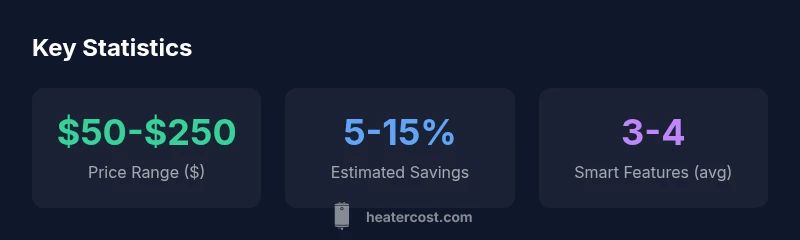
A space heater with wifi combines portable heating with smartphone control, scheduling, and energy monitoring. Typical price ranges are about $50 to $250, influenced by features like app compatibility, thermostat accuracy, and safety sensors. When used for targeted heating and zone control, these devices can improve comfort while avoiding waste. Heater Cost analyzes these devices for homeowners and renters alike.
Why space heater with wifi matters in 2026
The modern home increasingly relies on smart devices to manage comfort, safety, and energy costs. A space heater with wifi blends portable heating with remote control, scheduling, and usage insights. For renters and homeowners, this class of device can enable precise zoning—keeping bedrooms warm while cooling unused spaces. According to Heater Cost, the most compelling value comes from aligning heating with real-world routines, so you’re not wasting heat when nobody is home or when rooms are unoccupied. In practice, that means you set a schedule that ramps heat before waking, then cools down during the day. The result is more consistent comfort with fewer temperature swings, and a clearer view of running costs via app-based energy reporting. This section lays the groundwork for evaluating models that balance upfront cost, app reliability, and safety features.
How wifi connectivity enhances control and safety
Wifi connectivity expands control beyond a simple on/off switch. You can schedule heating patterns by room, set temperature targets for different times of day, and receive alerts if the heater detects an anomaly. This connectivity also enables voice assistant compatibility in many models, allowing quick adjustments without pulling out a phone. From a safety standpoint, remote monitoring means you can verify that the unit is operating within set parameters, and some models will push notifications if airflow is blocked or if a tip-over occurs. Heater Cost’s analysis emphasizes that the real benefit is in consistent zoning and timely reminders, not just remote on/off capability. However, the reliability of your home network, and the security of the connected app, are essential considerations.
What features to look for in a wifi space heater
When evaluating wifi-enabled heaters, prioritize: (1) app quality and platform compatibility (iOS/Android), (2) precise thermostat control (±1–2°C is common in better models), (3) real-time energy reporting and usage history, (4) safety features such as overheat protection, tip-over sensors, and auto shutoff, (5) regular firmware updates and vendor support, and (6) compatibility with smart-home ecosystems (Alexa/Google Home). A well-chosen model should offer intuitive setup, clear error messages, and offline operation as a fallback. While the feature list may appear daunting, focus on the core trio—control accuracy, safety, and reliable connectivity—and then layer on convenience features as needed.
Energy and cost considerations: running costs and efficiency
Energy efficiency for wifi space heaters varies by design, including how well they distribute heat (convection vs. radiant) and how effectively scheduling reduces idle runtime. In practice, you’ll typically see a modest energy impact when using a wifi-enabled heater for zone heating rather than keeping a whole-house heater on for extended periods. Expect upfront costs to range broadly, with higher-priced models offering better thermostat precision and longer firmware support. Real-world savings depend on room size, insulation, and how aggressively you optimize schedules. Heater Cost recommends running estimates that consider your climate, occupancy, and the cost of electricity in your area. Always compare models using the same usage patterns to gauge true cost differences.
Safety standards, certifications, and installation considerations
Safety remains paramount for any space heater, and even more so for wifi-enabled devices with connected components. Look for UL or ETL certification, automatic shutoff on overheating, tip-over protection, and overcurrent protection. WiFi components should be designed with secure pairing and regular firmware updates to protect against vulnerabilities. Placement matters: keep heaters on a stable surface, away from drapes, furniture, and occupant traffic paths, and avoid enclosed spaces where heat can accumulate. Installation usually requires no professional help, but you should follow the manufacturer’s clearance guidelines and avoid using extension cords. Regular maintenance includes cleaning dust from vents and inspecting cords for wear. These practices reduce the risk of malfunction and extend the device’s life.
Size, placement, and room compatibility for optimal results
Room dynamics strongly influence effective use of a wifi space heater. Start by sizing the heater to the room volume and insulation level; a well-insulated room may require less heat than a drafty space. Place the heater on a hard, level surface with several inches of clearance all around, particularly from walls and furniture. Elevation matters—placing units at or near knee height can improve airflow in some designs, while others benefit from elevated placement for better air distribution. If you’re using multiple zones, arrange heaters so they don’t directly heat the same space to avoid overheating. Finally, consider how door gaps, ceiling height, and window drafts affect performance, and adjust your scheduling accordingly.
How to compare models: a practical framework for buyers
Adopt a simple comparison framework: (1) Define your heating zone (size, occupancy, and insulation), (2) shortlist models with wifi control and safety certifications, (3) check app reliability and update history, (4) compare upfront price against potential annual energy costs, (5) assess warranty length and customer support, (6) look for energy-monitoring features that translate into actionable usage insights, and (7) read independent reviews to gauge real-world reliability. Use the same baseline conditions—room size, climate, and typical occupancy—to ensure a fair comparison. Keep in mind that the best option balances cost, control, and safety rather than chasing every feature.
Real-world scenarios: apartments, homes, and offices
In an apartment, a compact wifi space heater with good app support can quickly warm a small living area or bedroom; the key is ensuring it won’t overhear drafty windows. For a larger living room or home office, a paired setup with zoned control helps you avoid heating unused spaces. In commercial spaces like small offices, robust app dashboards and remote monitoring can help facilities staff manage multiple heaters efficiently. Regardless of setting, you’ll want to test scheduling against actual wake times and occupancy patterns to avoid unnecessary energy use. Heater Cost’s guidance emphasizes validating the heater’s response time to temperature adjustments and confirming that the app remains accessible during peak network load.
Maintenance, troubleshooting, and longevity of wifi heaters
To maximize longevity, perform regular maintenance: clean vents monthly, inspect cords, and apply manufacturer-recommended firmware updates promptly. If the app becomes unreliable, check your network, reset the device, and ensure the heater remains on a stable power source. If you notice unusual odors, excessive noise, or inconsistent heat, consult the user manual and contact customer support. A well-maintained wifi space heater not only lasts longer but also maintains safer operation by preserving proper airflow and avoiding overheating. Regular checks and updates are the simplest path to sustainable comfort.
Feature comparison: WiFi-enabled vs non-WiFi space heaters
| Aspect | WiFi-Enabled | Non-WiFi |
|---|---|---|
| Control options | App-based/Voice control, scheduling | Manual controls only |
| Energy reporting | Usually includes usage insights | Often none |
| Safety features | Overheat protection, auto shutoff, fault alerts | Basic safety features only |
| Maintenance | Firmware updates, app health checks | Minimal maintenance required |
| Placement considerations | Depends on app reliability and signal strength | Fewer connectivity considerations |
Got Questions?
What defines a space heater with wifi?
A space heater with wifi is a portable heater that can be controlled remotely via a smartphone app or voice assistant. It typically supports scheduling, temperature targets, and usage monitoring. The wifi component enables zoning and more precise control, but requires a stable network and trustworthy software updates.
A wifi space heater is a portable heater you control from your phone or voice assistant, with scheduling and energy tracking.
Are wifi space heaters energy efficient?
Energy efficiency depends on how you use them. When paired with scheduling and zoning, wifi heaters can reduce waste by heating only occupied spaces. Efficiency also hinges on the heater’s design (convection vs. radiant) and insulation. Expect varied performance across models, so compare energy reporting features and utilization recommendations.
They can be, when used for targeted heating and proper scheduling; efficiency varies by model.
What safety features should I look for?
Look for overheat protection, tip-over sensors, automatic shutoff, and child-safety features. Ensure UL or ETL certification and reliable firmware updates for wifi components. A clear user manual and responsive customer support are also important for long-term safety and peace of mind.
Check for overheat protection, tip-over sensors, and certified safety features.
Can I control wifi space heaters with smart home assistants like Alexa or Google Home?
Many wifi space heaters support popular assistants like Alexa or Google Home. Compatibility varies by model and app ecosystem, so verify supported platforms before purchasing. Keep in mind that voice commands should be supplemented with scheduling in the app for reliable routines.
Yes, many support Alexa or Google Home, but verify compatibility before buying.
Do wifi space heaters require professional installation?
Most wifi space heaters require no professional installation. They plug into standard outlets and are rated for typical indoor use. Always follow clearance and safety guidelines in the manual, and consider an electrician if you need dedicated circuits for multiple units or unique electrical setups.
Most don’t need professional installation, but check your electrical setup if you plan multiple units.
“WiFi connectivity adds real value when paired with proper zoning and safety standards; however, reliability of the app and network security are critical.”
The Essentials
- Prioritize safety features and app reliability.
- Balance upfront cost with potential energy savings.
- Ensure compatibility with your smart home ecosystem.
- Place heaters with safe clearance for optimal airflow.
- Tailor scheduling to your actual daily routine.