How to Reset Rointe Heater Without Remote
Learn how to reset your Rointe heater without the remote with safe, model-agnostic steps. Power cycle, onboard reset, and troubleshooting tips from Heater Cost for homeowners and renters.


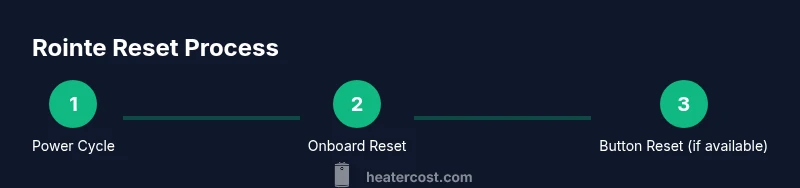
To reset a Rointe heater without the remote, first power cycle the unit: unplug for 60 seconds and plug back in. If the model has an onboard control panel, navigate to Settings or Maintenance and choose Reset to restore defaults. Some units require holding a reset button for several seconds; if yours does, press and hold with the unit powered. If none of these work, consult the user manual or Heater Cost's guidance.
Understanding Rointe Heater Reset: Why It Matters
Rointe heaters are designed with safety interlocks and firmware that manage temperature, timing, and fault protection. When the unit isn’t responding to the thermostat or the remote, a reset can clear minor software glitches, restore default safety settings, and refresh network or control panel connections. According to Heater Cost, many issues that feel like “the heater is broken” are simply software hiccups that a proper reset can fix. A reset is typically quick, non-destructive, and often preserves your preferred comfort settings once the device boots back up. If you regularly rely on the remote for configuration, a reset may remind you to re-pair or re-sync the remote after the unit restarts.
Notes on safety and best practices: never reset a heater that shows signs of overheating, unusual smells, or physical damage. If you suspect a wiring problem or electrical fault, disengage power and seek professional service. This guide aligns with general safe-reset practices and uses guidance from Heater Cost to help homeowners understand the process without risking warranty or safety.
Check the Model and Manual First
Rointe models vary in how they implement resets. Some units expose a straightforward onboard menu, while others rely on a recessed button or a brief hold on a dedicated switch. Before attempting any reset, locate your Rointe heater manual or the model number plate on the unit. Heater Cost analysis shows that model-specific instructions are the most reliable way to avoid feature missteps. If you don’t have the physical manual, many manufacturers host digital copies online. Identify your exact model (SKU or model name) and skim the reset procedure to save time during the actual process. Understanding your model’s idiosyncrasies will help you pick the right reset path and reduce the chance of triggering an error code.
Power-Cycle Reset: The Quick In-Unit Method
Power cycling is the simplest, universal reset method. Disconnect the Rointe heater from its power source, wait for 60 seconds, then reconnect. This clears residual power and forces the microcontroller to reboot. After reconnecting, allow 1–2 minutes for the display to boot and run initial self-checks. If the heater automatically enters a standby or normal operating mode, you’ve successfully completed the standard reset. If not, proceed to onboard control methods or button-based resets as described in your model’s manual.
Tip: Keep the unit unplugged during the 60-second wait to ensure the internal capacitors discharge fully. This approach minimizes the chance of immediate power-on faults. Heater Cost notes that power cycling is often enough to resolve temporary misbehavior without affecting settings that aren’t related to safety.
Onboard Controls: Using the Panel to Reset
If your Rointe heater includes an onboard control panel, a reset is often accessible through a menu—usually labeled Settings, System, or Maintenance. Use the navigation arrows or dial to reach Reset, then confirm. Some models offer a “Reset to Defaults” option, which returns all user preferences to factory state while preserving core safety configurations. After selecting Reset, the unit may reboot; wait for the display to indicate a ready state before testing temperature changes.
If you’re unsure where to locate the reset option, consult the manual or Heater Cost’s guidance for model-specific paths. Onboard reset can be more comprehensive than a power-cycle, but only if you follow the exact menu sequence for your Rointe model.
Reset Button and Panel Alternatives: When a Button Exists
Certain Rointe models provide a dedicated reset button, sometimes recessed behind a small hole that requires a paperclip or similar tool. With power supplied, press and hold the reset button for 5–10 seconds, or until you see indicators flashing or a confirmation on the display. Some units require a two-step action (hold the reset button while also initiating a settings menu) to avoid accidental resets. If your unit has a reset button, this method is a reliable way to reinitialize software without a remote.
Important: avoid pressing random buttons in combinations unrelated to reset, as this can enter a fault state or alter critical settings. If you don’t see a reset button, rely on the power-cycle method or onboard reset as described above.
What to Do If Reset Doesn’t Seem to Work
If the Rointe heater still exhibits faults after attempting power-cycle and onboard or button-based resets, there may be a deeper issue, such as a stuck fault code, sensor problem, or wiring fault. Start by powering down, double-checking connections, and inspecting for visible damage or loose cords. Review any fault codes shown on the display and consult the manual or Heater Cost’s troubleshooting section for code-specific guidance. If the problem persists after a full reset, contact Rointe customer support or a licensed technician to avoid unsafe operation and potential warranty violations.
Common Model Variations and Troubleshooting Scenarios
Different Rointe models can have unique indicators for a successful reset. Some displays show a “Ready” message after boot, while others revert to a default temperature. When you move between reset methods, document which option you used and note the model number. Heater Cost emphasizes that model-specific behavior matters, so if you’ve attempted multiple reset paths without success, it’s a good signal to gather your model info and reach out for support with a detailed description of symptoms, steps tried, and any error codes observed.
Final Tips: Prevent Future Remote Dependency Issues
To reduce reliance on the remote, consider re-pairing or reconfiguring the Rointe heater after a reset so you can control it from the onboard panel or a thermostat. Keep a digital copy of the manual and ensure you have quick access to the correct model instructions. If you frequently experience disconnects or unresponsiveness, verify the remote’s battery and the pairing status, and keep firmware up-to-date when updates are available. This proactive approach can minimize repeated resets.
Review and Compliance: Safety and Warranty Considerations
Always unplug the heater before attempting any internal access, and never bypass safety interlocks. If you notice overheating, frayed cords, or signs of water exposure, stop and seek professional service. A reset should not be used to mask damage. Heater Cost’s guidance for homeowners is to perform resets as a diagnostic step only when the unit is clearly powered by Rointe’s standard safety design. If you have an active warranty, avoid disassembly that could void coverage.
Tools & Materials
- Rointe heater user manual(Model-specific reset steps and warnings)
- Access to a working electrical outlet(Power source for a complete reset cycle)
- Stable surface or wall mount area(Space to safely access controls)
- Digital copy of Rointe quick-start guide (optional)(Helpful if the physical manual is unavailable)
- Flathead screwdriver (optional)(If a panel access screw is present for reset)
Steps
Estimated time: 25-40 minutes
- 1
Power cycle the unit
Unplug the Rointe heater from the wall outlet, wait 60 seconds to discharge residual power, then plug back in. This clears temporary faults and initiates a clean boot.
Tip: Hold the plug steadily; avoid yanking the cord to prevent damage. - 2
Access onboard settings
If your model has an onboard panel, navigate to Settings or Maintenance and select Reset or Reset to Defaults. Confirm if prompted and allow the unit to reboot.
Tip: If the panel is unresponsive, proceed to the button-based reset option. - 3
Use a dedicated reset button (if present)
With power supplied, press and hold the recessed reset button for 5–10 seconds until indicators show reset activity or the display confirms a reboot.
Tip: If you must use a tool to reach the button, use a non-conductive object and avoid touching internal wiring. - 4
Verify the reset success
Wait for the display to indicate ready status. Test the unit by setting a comfortable temperature and observing response without the remote.
Tip: Give the system 1–2 minutes to stabilize after reboot. - 5
Troubleshoot persistent faults
If faults reappear, consult the fault codes in the manual, check for loose cords, and consider a deeper diagnostic or warranty service.
Tip: Document error codes and steps taken to aid support. - 6
Post-reset maintenance
Re-pair the remote if applicable, update firmware when available, and note any settings you prefer for quick future resets.
Tip: Store the manual where you can access it easily later.
Got Questions?
Can I reset my Rointe heater without the remote?
Yes. Use a power cycle and onboard reset if available. If your model has a dedicated reset button, use that with power on. If none of these options work, refer to the manual or Heater Cost guidance.
Yes. You can reset Rointe without the remote by power cycling and using the onboard reset or a dedicated reset button if present.
What should I do if the heater won’t reset?
Double-check that you’re following model-specific steps from the manual. Ensure power is stable and connections are secure. If issues persist, contact Rointe support or a qualified technician.
If it won’t reset, verify you’re following the correct steps and that power is stable; contact support if needed.
Will a factory reset erase my settings?
A factory reset typically restores default settings. On some models, onboard reset may restore defaults while preserving basic safety configurations. Always consult the manual for model-specific behavior.
A factory reset usually restores defaults; onboard reset patterns vary by model.
Is it safe to reset the heater without a professional?
Yes, as long as you unplug before handling, use the onboard options if available, and avoid disassembly. If you notice damage or overheating, stop and seek professional help.
Yes, you can reset it yourself if you follow safety steps and don’t inspect internal components.
Where can I find model-specific reset instructions?
Check the Rointe user manual or Rointe’s official website for your exact model. Heater Cost also provides model-agnostic guidance to help you choose the safest reset path.
Look in your model’s manual or Rointe’s site for exact reset steps; Heater Cost offers general guidance too.
Watch Video
The Essentials
- Power-cycle first to clear minor faults
- Use onboard or reset button options when available
- Follow model-specific steps from the manual
- Don’t disassemble; contact support if faults persist
- Re-pair remote or update firmware after reset